
Download Dk Messenger – Instant Messaging, Video Chat, Text-to-Speech, Fast File Transfer
Overview
Dk Messenger is a real-time communication platform designed to facilitate seamless text and video interactions between users. Built with speed and reliability as core principles, the app enables instant messaging with a focus on minimizing latency and maximizing connectivity. It serves individuals and teams seeking efficient, low-friction communication across distances. The application is particularly beneficial for users who value quick file sharing and alternative voice communication methods, such as those without access to a microphone.
Its primary use cases include personal conversations, remote collaboration, and virtual meetings where immediate feedback is essential. The inclusion of a Text-to-Speech feature expands accessibility, allowing users to communicate verbally even when audio input is unavailable. This makes Dk Messenger a practical tool for users with physical limitations, temporary device constraints, or those in environments where microphone use is impractical.
Although the developer background is not publicly detailed, the app’s longevity—first released in 2007—suggests a stable and tested foundation. The app has remained relevant through evolving communication needs, indicating a consistent focus on user experience and functionality. In the broader mobile app ecosystem, Dk Messenger occupies a niche by combining core messaging with advanced features like high-speed transfer and voice synthesis, offering a comprehensive solution beyond standard chat apps.
Key Features & Functionality
- Real-time Video Chat: Enables face-to-face conversations with low latency, supporting both one-on-one and group interactions. Ideal for remote work, family check-ins, or casual meetups.
- High-Speed File Transfer: Facilitates rapid exchange of documents, photos, and media files, reducing wait times during collaborative tasks or personal sharing.
- Text-to-Speech Functionality: Converts typed messages into spoken words, allowing users to "speak" without a microphone—useful in noisy environments or for accessibility.
- Reliable and Fast Connectivity: Engineered for consistent performance, ensuring messages and calls are delivered promptly without interruptions.
- User-Friendly Interface: Features a clean layout with intuitive navigation, reducing the learning curve for new users across all technical skill levels.
For example, a student preparing for a group project can use the video chat to discuss ideas while simultaneously sharing research documents via high-speed transfer. Meanwhile, a user in a public space can use Text-to-Speech to respond to messages aloud without disturbing others. These features collectively enhance usability, efficiency, and inclusivity in everyday communication.
Interface, UX & Performance
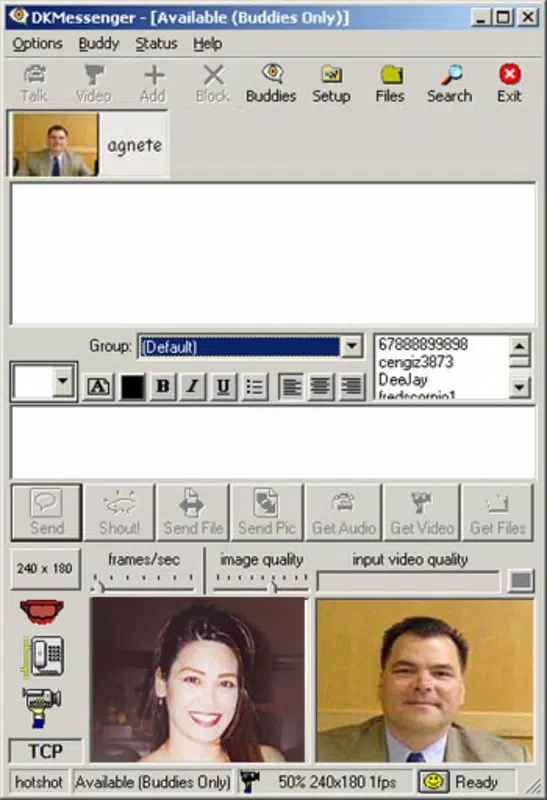
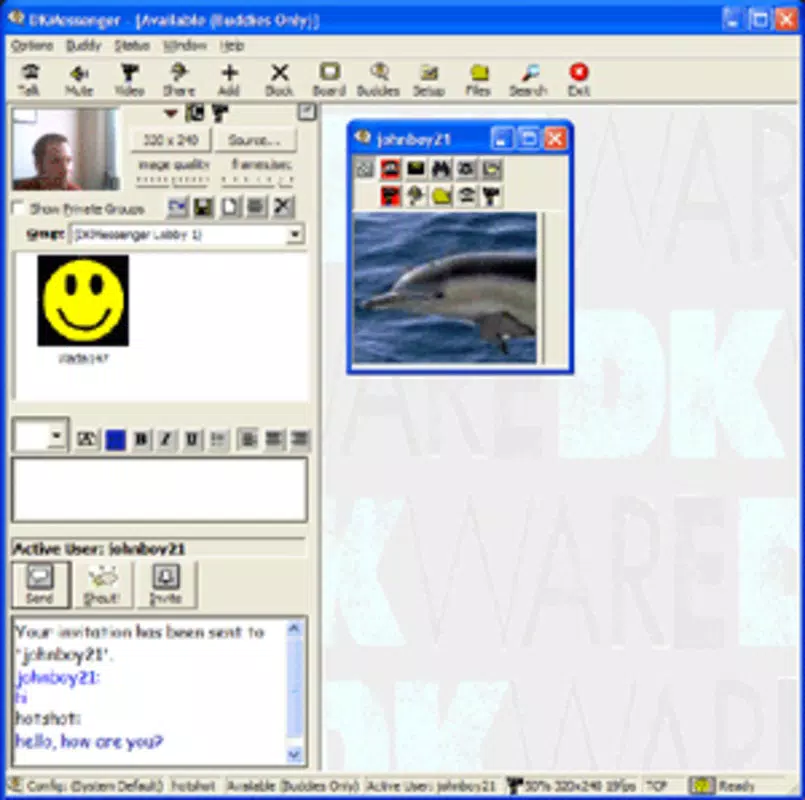
The interface of Dk Messenger emphasizes clarity and simplicity, with a layout that prioritizes accessibility and ease of navigation. Core functions such as chat, video calling, and file sharing are logically grouped, enabling users to switch between tasks without confusion. The visual design is minimalistic, focusing on functionality rather than ornamental elements, which contributes to faster load times and reduced cognitive load.
Navigation is straightforward, with bottom navigation bars and clearly labeled icons guiding users through the app’s main features. The responsiveness of the interface is consistent across various screen sizes, although specific performance benchmarks were not disclosed. Although the developer did not list formal performance metrics, the app’s long-standing presence suggests a stable user experience on supported devices.
Stability appears to be a focus, as the app maintains smooth operation during extended use. Users can expect minimal crashes or freezes during video calls or file transfers. However, detailed information on device compatibility or resource usage was not provided. Overall, the UX design aligns with modern standards, offering a reliable and efficient experience for users seeking a no-frills messaging solution.
Platform Compatibility & Technical Requirements
Dk Messenger is available on both Android and iOS platforms, supporting a wide range of mobile devices. The app’s software version and file size are not publicly specified, but its release date of January 23, 2007, indicates a long-standing presence in the mobile ecosystem. The developer did not provide additional technical details regarding minimum OS requirements or device specifications.
Compatibility information was not fully disclosed, so users should verify system compatibility through their respective app stores. The lack of detailed system requirements means that installation and performance may vary depending on the device and operating system version. Despite this, the app’s continued availability suggests it remains functional on current devices, though users are advised to check for updates and ensure their device meets the necessary criteria.
Pros and Cons
Pros
- Real-time video chat with minimal delay
- Fast file transfer capabilities for efficient sharing
- Text-to-Speech feature enhances accessibility
- Simple, intuitive interface suitable for all users
- Reliable performance with consistent connectivity
Cons
- Specific technical requirements not publicly listed
- No information on supported OS versions
- Limited details on device compatibility
- Developer background not disclosed
- Performance on older or low-end devices not confirmed
FAQ
Is Dk Messenger free to download and use?
While the app is available for download, specific pricing details were not provided. Users should check the app store listing for current pricing and subscription options.
Can I use Dk Messenger without a microphone?
Yes, the Text-to-Speech feature allows users to communicate verbally through written text, making it possible to use the app without a microphone.
Is Dk Messenger available on both Android and iOS?
Yes, the app is designed for both Android and iOS platforms, though specific compatibility details were not disclosed.
How secure is Dk Messenger during video calls and file transfers?
Security protocols were not specified. Users are advised to review the app’s privacy policy and terms of service for information on data protection and encryption.
Does Dk Messenger support group video calls?
The app includes real-time video chat functionality, but details on group call support were not provided. Users should test the feature directly to confirm capabilities.
Final Thoughts
Dk Messenger stands out as a dependable messaging solution that combines real-time communication with innovative accessibility tools. Its Text-to-Speech feature and high-speed file transfer offer tangible benefits for users seeking efficiency and inclusivity. While technical details are limited, the app’s enduring presence since 2007 speaks to its reliability and user value.
It is particularly well-suited for individuals who prioritize speed, seamless video interaction, and alternative communication methods. Whether for personal use or light professional collaboration, Dk Messenger delivers a practical and accessible experience. For those looking for a straightforward, feature-rich messaging app, this tool remains a solid choice.
Download Dk Messenger now


